
Divorce Records in Hidalgo County are maintained by the District Clerk and include the petition, court filings, orders, the final decree, and any post‑judgment documents. You can perform a Hidalgo County divorce records search or quick lookup online at the official portal, or locate a case by spouse name, case number, filing date, or court. The system shows case status, judgment date, and basic party information, helping you verify the correct file before requesting a certified copy.
Divorce Records can be obtained in person, by mail, or through an online request, each requiring a valid ID and a small copy fee. A Hidalgo County certified divorce record copy adds a $5 certification charge and is accepted for name changes, property transfers, and child‑support enforcement. When you lack the case number, a brief Hidalgo County divorce record request using a spouse name lookup will locate the file, after which the clerk issues the document within one business day.
How to Search Divorce Records
The Hidalgo County District Clerk maintains the official case files for every divorce filed in the county. You can view most of these files online through the public access portal at no cost, or visit the clerk’s office in person to inspect the original documents. To explore further official documentation and local county filings, you can consult divorce decree. The portal displays the case number, parties’ names, filing date, judgment date, court, and current case status. Knowing one piece of identifying detail — a party name, case number, or filing date — lets you pull the full case.
Official Search Portal: https://pa.co.hidalgo.tx.us/default.aspx
Steps to Search
- Open the Hidalgo County Public Access portal at https://pa.co.hidalgo.tx.us/default.aspx.
- Choose “Case Search” from the menu options.
- Select “Family Law” or “Domestic Relations” as the case category when prompted.
- Enter at least one search field — last name, first name, case number, or filing date range.
- Click “Search” to load the list of matching cases.
- Click the matching case number to open the case detail screen.
- Review the displayed details: party names, court, filing date, judgment date, and case status.
- Write down the case number if you plan to request a certified copy later.
Search by Spouse Name
Searching by spouse name works when you know the full legal name of either party at the time the case was filed. The portal accepts last name, first name, or both. Names are stored exactly as printed on the divorce petition, so an older case may show a maiden name or a former married name. If the name you type returns no results, try a different spelling, drop the middle name, or remove suffix letters such as “Jr.” or “Sr.” Name searches return every case linked to that person, not only divorce cases.
Search by Case Number
A case number search is the fastest way to locate a specific file. Hidalgo County assigns each divorce a unique case number that includes a court prefix (such as “F” for family cases) followed by a sequence of digits and the year. Entering the full case number — including all letters and dashes — pulls the exact case on the first try. The case number stays the same throughout the life of the case, even after the decree is signed.
Search by Filing Date
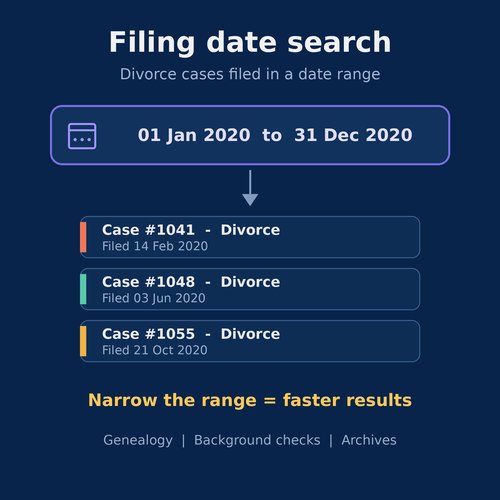
Filing date searches help when you do not know a name or case number but know roughly when the case was filed. The portal lets you enter a date range — a single day, a month, or a year — and returns every divorce case filed in that window. Use this method for genealogy research, background checks, or when sorting through archived cases. Narrow the range for a faster search result.
Search by Court
Each divorce in Hidalgo County is assigned to a specific district court. The portal lets you filter results by court when you know which judge or court handled the case. Court searches return every active and closed divorce assigned to that court, which can number in the thousands for a long-serving court. Combine a court filter with a name or date range to narrow the list.
Details Needed for a Search
The portal accepts partial data, but a complete search works best with at least two identifiers. The most useful identifiers are full legal name (last and first), case number, filing date range, or court. The system matches on the data you provide, so spelling accuracy matters. Date fields accept the standard MM/DD/YYYY format. Searches return matches instantly, with the most recent filings shown first by default.
What Divorce Records Contain
A Hidalgo County divorce record is a complete file covering the petition, every document filed during the case, the final decree, and any post-judgment filings. The summary screen on the portal shows the basic identifying facts. The full file — viewable at the clerk’s office — contains every paper the parties and the court added to the case. The level of detail varies by case, since some divorces are simple and others involve property, children, or business interests.
Names of the Parties
The case file lists the full legal name of the petitioner and the respondent exactly as written on the petition. After the decree, the file may contain updated names if a party completed a name change. Maiden names and former married names appear in the file if they were used in the case. The names match the official identification on file with the court.
Case Number
Every divorce receives a unique case number when the petition is filed. The number identifies the court, the year of filing, and the sequence in which the case was opened. The same case number applies to every document in the file, from the petition to the final decree and any post-judgment motions. The case number is the simplest way to find the file again later.
Filing and Judgment Dates
The filing date is the day the clerk stamped the petition as received. The judgment date is the day the court signed the final decree of divorce. The time between these two dates can be as short as 60 days — the Texas waiting period for most divorces — or much longer, depending on the complexity of the case, service of process issues, continuances, or settlement negotiations.
Court Details
The court section names the specific district court that handled the case — for example, the 206th District Court, 332nd District Court, or 398th District Court of Hidalgo County. The court assignment does not change during the case. For post-judgment motions, the same court retains jurisdiction unless the case is transferred.
Case Status
The case status tells you where the case stands in the legal process. Common statuses include “Active,” “Disposed,” “Pending,” “Dismissed,” and “Closed.” A disposed status means the court issued a final ruling. A closed status means the post-judgment window for further filings has ended or the file has been archived. The status updates as documents are filed.
Divorce Outcome
The divorce outcome records what the court ordered. Outcomes include “Granted” (the court approved the divorce), “Dismissed” (the petitioner withdrew the case), or “Transferred” (the case moved to a different court). For granted divorces, the file also states whether the decree was entered by default, by agreement, or after a contested hearing. The decree itself spells out property division, custody, and support orders.
Divorce Case Documents
The full divorce file contains every paper the parties, attorneys, and court generated during the case. Some documents — such as the petition and decree — appear in every file. Others, such as motions for temporary orders, child custody evaluations, or financial disclosures, appear only when the parties raised those issues. Each document has a file stamp showing the date it was added to the case.
Divorce Petition
The petition is the first document filed in any divorce case. It identifies the petitioner and respondent, states the date and place of marriage, lists the names and birth dates of any minor children, and asks the court to dissolve the marriage. The petition also outlines what the petitioner wants from the court: property division, custody, child support, spousal support, or a name change.
Court Filings
Court filings are the documents either party or the court itself added after the petition. Filings include responses (the other spouse’s answer), counter-petitions, motions, requests for temporary orders, financial statements, and discovery materials. Each filing has a file stamp and an entry on the case docket. Some filings are sealed by court order and may not appear in the public portal.
Court Orders
Court orders are signed rulings from the judge. Orders cover temporary matters during the case (such as temporary custody, temporary support, or temporary restraining orders) and final matters at the end (such as the final decree of divorce). Some orders are signed after a hearing; others are signed without a hearing when both parties agree. Each order carries the judge’s signature and the date it was signed.
Divorce Decree
The divorce decree is the court’s final ruling that ends the marriage. Once signed by the judge, the decree restores each party to the status of single and states the terms for property, debt, custody, support, and any name changes. The decree takes effect 31 days after it is signed, which is the appeal window under Texas law.
Final Judgment
The final judgment is the same document as the decree in most Hidalgo County divorce cases — the two terms are used interchangeably. The judgment includes findings of fact, conclusions of law, and the relief granted to each party. The clerk files the original with the case and issues certified copies to either party on request.
Post-Judgment Documents
Post-judgment documents cover actions taken after the divorce is final. These include motions to enforce the decree (for unpaid support), motions to modify (for changed custody or support circumstances), motions for contempt, and motions to clarify ambiguous decree language. The same case number stays on these filings, and they remain part of the same court file.
Hidalgo County Divorce Records Information
Hidalgo County divorce records are public records under the Texas Public Information Act (Texas Government Code Chapter 552), with limited exceptions for sealed or restricted material. The District Clerk provides three access channels: an online portal for basic case details, in-person file review at the courthouse, and written requests for copies. Some records — those involving minor children, certain financial details, or sealed cases — have restricted access.
Public Divorce Records
Public divorce records include the docket sheet, case summary, petition, response, motions, orders, and the final decree. Anyone can view these documents at the clerk’s office during business hours or pull a summary from the public portal. The clerk does not require ID for viewing public records in person. Printed copies have a per-page fee.
Online Case Information
The online portal at https://pa.co.hidalgo.tx.us/default.aspx lets you search cases, view dockets, and see party details without registering or paying. The portal updates daily with new filings. Image viewing of specific documents may require a registered account or an in-person visit. The portal covers cases filed in the District Clerk’s office.
Clerk’s Office Records
The clerk’s office at 100 N. Closner Blvd., Edinburg, TX 78539, holds the original paper and electronic files for every divorce filed in Hidalgo County. Office staff can pull a file, let you inspect it, and produce copies or certified copies. Office hours run Monday through Friday, 8:00 AM to 5:00 PM. Visits outside these hours require a written request or an appointment.
Restricted Records
Restricted records are files the court has limited by order. Common restrictions cover financial statements, child custody evaluations, and adoption-related filings. A judge signs the order restricting access, and only the parties, their attorneys, and certain state agencies can view restricted files. The restriction stays in place until a court order lifts it.
Sealed Documents
Sealed documents are removed from public view entirely. A judge can seal a document or an entire case upon motion and a showing of good cause. Examples include cases involving minors, safety concerns, or sensitive financial material. Once sealed, the document is not visible on the public portal and requires a court order to open.
Confidential Details
Confidential details include Social Security numbers, financial account numbers, and certain medical data. The clerk redacts confidential details from public copies under Texas Rule of Civil Procedure 21c. The original unredacted document remains in the court file. Certified copies contain the same redactions as public copies.
How to Obtain Divorce Records
You can get a copy of a Hidalgo County divorce record through three channels: online request, mail request, or in-person visit. Each channel requires a valid form of identification and payment of the copy fee. A standard copy is suitable for personal records. A certified copy carries the clerk’s seal and is accepted for legal matters such as name changes, remarriage, property transfers, and child support cases.
Online Requests
The portal allows you to request a copy of the decree and other documents through the online request system. You enter the case number, the documents you want, your contact details, and pay the fee. The clerk processes the request during business hours and mails the copy or sends a digital version, depending on the request type.
Mail Requests
Mail requests are sent to the Hidalgo County District Clerk at 100 N. Closner Blvd., Edinburg, TX 78539. The request must include the case number (or enough identifying details to locate the case), the documents requested, a copy of your valid ID, and a check or money order for the fees. The clerk returns the copy by mail once the request is processed.
In-Person Requests
In-person requests are the fastest option. Visit the District Clerk’s office at 100 N. Closner Blvd., Edinburg, TX 78539, between 8:00 AM and 5:00 PM, Monday through Friday. Bring your valid photo ID, the case number (if you have it), and payment for the fees. Standard copies are usually issued the same day. Certified copies take one business day.
Identification Requirements
Texas law requires ID for certified copies of divorce records. Accepted forms include a state driver’s license, state ID card, U.S. passport, military ID, or other government-issued photo ID. The clerk checks the ID against the request and keeps a copy in the request record. For mail requests, include a photocopy of the ID with the request. Without valid ID, the clerk issues a non-certified copy.
Copy Fees
Standard copies cost $1.00 per page. Certification adds a $5.00 fee per document. Additional fees may apply for documents larger than 8.5″ x 14″ or for special handling. Payment is accepted by cash, check, money order, or credit card at the counter. Online and mail requests require payment by card or money order. Fees are set by the Texas Legislature and are non-negotiable.
Certified Copies
Certified copies carry the District Clerk’s raised seal and the clerk’s signature. A certified copy of a divorce decree is required for remarriage, name changes, Social Security updates, property transfers, and child support matters. The clerk issues certified copies the same day for in-person requests, or within one business day for online and mail requests. Each certified copy is a separate document with its own fee.
| Document Type | Fee | Processing Time |
|---|---|---|
| Standard copy (per page) | $1.00 | Same day (in person) |
| Certified copy (per document) | $5.00 plus page fee | 1 business day |
| Online request | Same fees plus handling | 2–3 business days |
| Mail request | Same fees plus postage | 5–7 business days |
Divorce Records and Case-Related Details
Beyond the basic case identifiers, divorce files contain detailed material on the issues the court decided. The exact contents depend on what the case involved. A simple no-children divorce may contain only a petition and decree. A divorce involving children, a family business, or significant assets contains additional orders, financial statements, and findings.
Property Division
Property division records show how the court split marital assets and debts. The decree lists each piece of real estate, vehicle, bank account, retirement account, and debt, and assigns it to one party or the other. The court presumes an equal division of community property under Texas law, but the parties can agree to a different split. The decree binds both parties to the terms.
Child Custody and Conservatorship
Child custody records in Texas are called conservatorship orders. The court names each parent as a joint managing conservator or sole managing conservator and assigns specific rights (such as the right to make educational decisions or medical decisions) and duties. The order also states the child’s primary home address and the geographic restriction (often the Hidalgo County area).
Child Support
Child support records show the amount of support the obligor must pay, the frequency (usually monthly), the payment method (often through the Texas Child Support Disbursement Unit), and the start date. The amount is set using the Texas child support guidelines, based on the obligor’s net resources and the number of children. The order continues until each child turns 18 or graduates high school.
Spousal Support
Spousal support (also called alimony or maintenance) records show the amount, duration, and conditions for any payments from one former spouse to the other. Texas limits spousal maintenance to specific situations: marriages lasting 10 years or more, or cases involving family violence or disability. The order spells out the payment schedule and the end date.
Parenting and Visitation Orders
Parenting and visitation orders detail the possession schedule for the child. Texas uses a Standard Possession Order, which sets out specific weekends, holidays, and summer periods. The order can be customized for the family’s needs. The order also covers transportation responsibilities, communication between parent and child, and rules for exchanging the child.
Post-Divorce Modifications
Post-divorce modification records cover changes to the original orders. Common modifications include changes in child support due to income changes, changes in custody due to relocation, or changes in visitation due to the child’s age. Modifications require a new filing and a court hearing. The same case number stays on the file.
Divorce Record Privacy and Availability
Divorce records are public, but Texas law limits access to certain sensitive material. The clerk balances public access with privacy protections required by state and federal law. Some material is hidden from public view automatically. You can also cross-reference these findings by accessing verified marriage records online. Other material requires a court order to access. Knowing what is public and what is restricted helps you decide what you can obtain directly and what requires legal action.
Protected Personal Details
Protected personal details include Social Security numbers, driver’s license numbers, and the issue of public benefits. The clerk redacts these details from public copies under Texas Rule of Civil Procedure 21c. The original documents in the court file still contain the unredacted data, viewable only by parties, attorneys, and authorized agencies.
Financial Details
Financial details include income figures, bank account numbers, credit card numbers, and investment account numbers. Financial statements are filed under seal in many divorce cases, so they do not appear on the public portal. When financial data is part of a public order, the clerk redacts account numbers and Social Security numbers before issuing copies.
Child-Related Details
Child-related details — names, birth dates, school names, and medical data — are protected when they appear in certain documents. The clerk may redact the names of minor children in certain publicly available documents, particularly in cases involving protective orders or sealed files. The original file contains the full data for the parties and their attorneys.
Sealed Case Materials
Sealed case materials are documents the court has removed from public view. A party must file a motion and show good cause to seal a document or an entire case. Common reasons include adoption, name changes for minors, and cases involving safety concerns. Once sealed, the documents are not visible on the portal and require a court order to access.
Records With Limited Access
Records with limited access include pre-adoption records, mental health evaluations, and certain family-court records that involve minors. Limited access records may be open only to the parties, their attorneys, or specific state agencies. The clerk can explain who qualifies for access and what paperwork is required for each type of limited record.
Divorce Record Accuracy and Search Limitations
The Hidalgo County District Clerk works to keep records up to date, but search limitations exist. Records may be delayed, missing, or filed in a different court. Knowing the limitations helps you avoid the wrong result and find the correct file faster. Always verify the case you find before requesting a certified copy.
Confirming the Correct Divorce Case
Before requesting a certified copy, confirm the case matches your search. Check the parties’ names, the filing date, and the court. A small spelling difference or an extra digit in the case number can pull a different file. The clerk can confirm the case number over the phone at (956) 318-2200 during normal business hours.
Matching Spouse Names
Names on divorce records are the legal names at the time of filing. A maiden name, a former married name, or a hyphenated name may appear instead of the current legal name. If the name you search returns no results, try the name the person used at the time of the divorce, not the current name. The clerk can help locate a file with a partial name match.
Verifying Case Numbers
Verify the case number before placing a request. The case number includes a court prefix, a sequence of digits, and the year. A single wrong digit returns a different case or no result. The portal shows the case number on the search results screen. Cross-check it against any documents or communications you have about the case.
Recently Filed Records
Recently filed records may take several days to appear on the portal. The clerk stamps the petition on the filing date, but the digital index updates on a delay. A divorce filed this week may not show up in the public search until the following week. If you do not find a recent filing, wait a few days and try again.
Missing Documents
Missing documents are rare but possible. The clerk pulls the original file for inspection when a search cannot locate a document. If a document is missing from the file, the clerk will tell you. Missing documents are not replaced from secondary sources — the court file is the official record.
Delayed Record Updates
Delayed record updates affect the online portal more than the in-person file. A signed order may not appear on the portal for several business days after the judge signs it. The clerk’s office has the most up-to-date data. For time-sensitive requests, call the clerk at (956) 318-2200 to confirm the latest status.
Records Held by Another Court
Records held by another court include cases transferred from Hidalgo County to another county or state. The portal only shows cases filed in Hidalgo County. A case filed in a different county or a different state will not appear here. Contact the clerk in the original filing county for those records.
Search Problems
Search problems are common, and most are easy to fix once you know the cause. The most frequent issues involve name spelling, missing case numbers, and the wrong court. Working through these problems systematically helps you find the right file faster.
No Divorce Record Found
If a search returns no records, the case may be filed under a different name, in a different county, or under a sealed status. Try a name spelling variation, a different date range, or a different court. If the case still does not show, contact the clerk’s office at (956) 318-2200 for help. The clerk can run a manual search using different identifiers.
Incorrect Name or Spelling
Incorrect name spelling returns wrong results or no results. The portal matches on exact spelling. Try variations: with and without the middle name, with and without a suffix, with the maiden name, and with the former married name. The clerk can help if you are unsure of the spelling at the time of filing.
Incorrect Case Number
An incorrect case number returns the wrong case or no case. The case number is specific — one wrong digit or one missing letter sends you to a different file. Use the full case number, including the court prefix and the year. If you do not have the case number, search by name instead.
Wrong Court or County
A case filed in the wrong court or county will not appear on the Hidalgo County portal. Divorces are filed in the county where the petitioner or respondent resides. If the divorce was filed in a different Texas county, check that county’s portal. Texas has 254 counties, each with its own District Clerk.
Record Not Yet Available
Records not yet available are usually recent filings. The portal indexes new cases within a few business days. Wait a few days and try again. For urgent requests, call the clerk’s office at (956) 318-2200 to ask when the record will be available.
Restricted or Sealed Record
Restricted or sealed records do not appear in public searches. The portal only displays cases that are open to the public. To access a sealed or restricted record, you must file a motion with the case and obtain judicial authorization. The clerk’s office can explain the procedure for seeking access to a sealed file.
Contact Details
For questions about divorce records, certified copies, or case searches, contact the Hidalgo County District Clerk directly. The clerk’s office is located at the Hidalgo County Courthouse and is open during regular business hours.
| Contact Type | Details |
|---|---|
| Office Name | Hidalgo County District Clerk |
| Address | Hidalgo County Courthouse, 100 N. Closner Blvd., Edinburg, TX 78539 |
| Phone | (956) 318-2200 |
| Office Hours | Monday – Friday: 8:00 AM – 5:00 PM |
| Search Portal | https://pa.co.hidalgo.tx.us/default.aspx |
Frequently Asked Questions
Divorce Records in Hidalgo County give legal proof of a marriage ending. They help with name changes, benefits, property transfers, and court matters. You can view basic case details for free online, then request official copies when a court or agency requires them. Knowing where to look, what documents are needed, and how much it costs saves time and avoids extra trips. This FAQ answers the most common questions about searching, requesting, and receiving Hidalgo County divorce records.
How can I search Hidalgo County divorce records online?
You start at the Hidalgo County public‑access portal. Enter the site, choose “Family” then “Divorce” from the menu. Type a party’s last name, a case number, or a filing date. The screen shows the case number, filing date, judgment date, court, and current status. If the record is not listed, note the case number and call the District Clerk at (956) 318‑2200. The clerk can confirm whether the file is in storage or needs a mailed request. This method lets you see most details without leaving home.
What information is needed to request a certified copy of a Hidalgo County divorce decree?
To get a certified Hidalgo County divorce decree you must submit a copy request form. Fill the form with the case number, names of both parties, and the filing year. Attach a clear copy of a driver’s license or passport for each requester. Pay the $5 certification fee plus $1 per page for the copy. Send the package by email, fax, or mail to the District Clerk office. When the clerk receives the request they will print the decree, add a raised seal, and return it by mail or hold it for pick‑up within five business days.
How do I find divorce case status by case number in Hidalgo County?
If you already know the case number, locate the status in three simple steps. First, open the Odyssey public‑access site linked from the Hidalgo County homepage. Second, choose “Case Search” and enter the exact case number in the box. Third, read the summary that lists filing date, parties, current disposition, and any upcoming hearings. For recent filings the site may show “pending” until a judge enters a judgment. Call the District Clerk if the status reads “closed” but you need a copy of the final decree.
Where can I obtain a sealed or confidential Hidalgo County divorce record?
Sealed or confidential Hidalgo County divorce files are not viewable online. To access them you must first obtain a court order that lifts the seal. File a motion with the district judge explaining why you need the record. If the judge signs the order, submit it to the District Clerk along with a government‑issued ID and the $5 certification fee. The clerk will then release the requested pages. Without a court order the record remains hidden and the clerk will refuse any copy request.
What are the fees and processing time for a Hidalgo County divorce record copy?
The District Clerk charges $1 for each page of a paper copy and $1 for the first ten pages of an electronic copy; additional electronic pages cost $0.10 each. Certification adds $5 per document. Payment is accepted by credit card, cash, or check. After the clerk receives a complete request they usually finish the copy within one to two business days. Mail requests may take three to five days because of postage. If the file is stored off‑site the clerk adds a short retrieval delay, typically an extra 24‑48 hours.